Picture this: your first day at a tech firm internship. A laptop appears on your desk, along with a sheet holding four hundred names – leads, they call them. The boss says it’s time to reach out, set up meetings, get things moving. No guide exists. Nothing outlines what to say or how to reply. Tracking responses? That idea hasn’t been invented here yet. Messages go out one by one, typed fresh each time. Half the people never hear back from you again – you lose their name in the noise. Three weeks pass. Now every new email feels like digging through old ones just to remember who answered, who vanished, who might still care.
Tools such as Salesloft show up precisely when problems like that arise. Walk into this 2026 review and discover the truth about the system – its purpose, its audience, pricing details unfold slowly here, strengths stand tall while weaknesses reveal themselves in quiet moments. Real experiences gathered from scattered voices form this account; skip the shiny brochures, expect honesty instead. Reality shapes every line.
Curious about sales tech as a learner? That’s where this fits. New to B2B selling, wondering which tools matter most on the job? This covers exactly that. For those stepping into the field, clarity comes through real-world usage – here it shows up plainly.
What Is Salesloft and Why Do Sales Teams Use It?
Started back in 2011, Salesloft builds tools that help sales teams stay on top of conversations with people who might buy their products. Based in Atlanta, the system keeps track of emails, calls, and follow-ups all in one place. Instead of scattered notes or spreadsheets, reps get reminders, templates, and timing suggestions built into daily workflows. Big brands such as Google and Cisco rely on it, though plenty of smaller firms do too. More than five thousand organizations now use the platform to keep outreach organized. Even Shopify and IBM turned to it when streamlining how their sellers connect with leads. Time after time, teams find fewer missed messages once they switch over. Though not flashy, its strength lies in keeping communication steady and traceable.
Most of a rep’s time gets lost deciding whom to reach, when to dial, what words fit best. Salesloft steps in there, quietly managing those tasks. Instead of tracking opens or guessing timing, people talk – real exchanges happen. The system handles setup, follow-up nudges, sequence logic. What remains? Just the back-and-forth only humans do well. Not automation pretending to connect. Moments where voice matters more than scripts.
Let me explain this simply. Think of Salesloft as a very organized personal assistant for a salesperson. It tells you who to contact today, how to contact them, keeps a record of every interaction, syncs everything to your CRM (that’s a customer relationship management system, basically a database of all your customers and leads), and lets your manager see how you’re doing. That’s the pitch, anyway. Whether it delivers on all of that is what this review is really about.
Salesloft Review 2026: The Main Features Explained
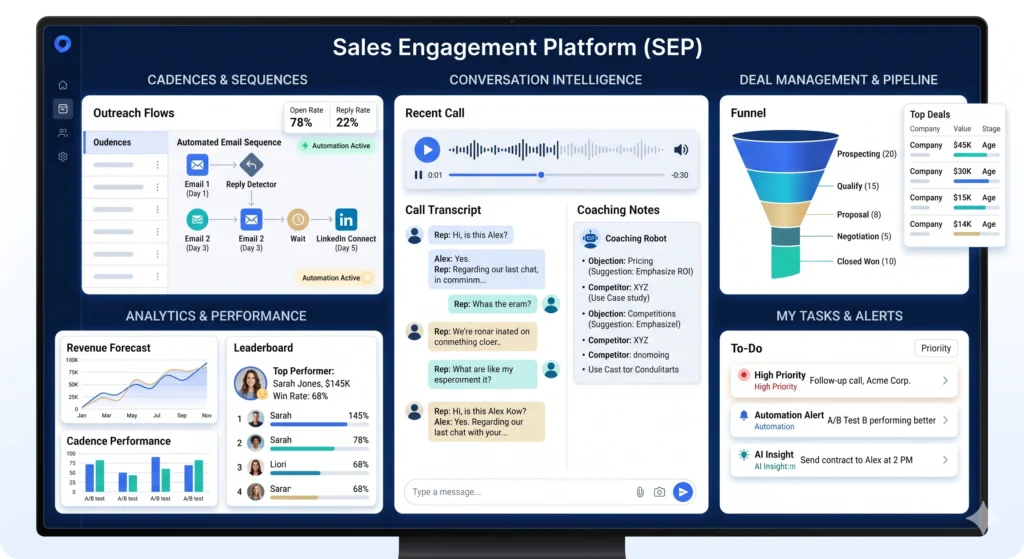
Cadences: The Core of How Salesloft Works
One thing stands out about Salesloft – its cadences. Think of a cadence as a sequence of outreach steps aimed at connecting with someone. Picture starting with an email right away, then waiting two days before making a call. Jump ahead three more days and send a note through LinkedIn instead. Nine days in? Send another email. Wrap it up by trying the phone again around day fourteen.
Most mornings, you just follow what shows up. After the rhythm clicks, Salesloft takes over – emails go out on their own. A nudge appears when a call fits next. Any reply stops everything instantly. No sorting through two hundred names daily wondering who gets a message. Tasks line up ready-made; move down the list at your pace.
Most people agree the cadence tool inside Salesloft stands near the top among available options. Over on G2, salespeople mention it shapes their daily flow – yet somehow avoids seeming robotic. A single comment said it clearly: knowing the next step comes easily, so less brainpower goes toward organizing tasks. That shift leaves more room for real dialogue instead.
Still, building intricate sequences with decision paths – what follows hinges on a prospect’s actions – demands testing, especially for first-time users of sales tools. Getting comfortable with deeper setup isn’t instant. Mastery comes slowly.
Conversation Intelligence and Call Recording
Salesloft records and transcribes sales calls. After a call, you get an automatic summary, flagged action items, and a searchable transcript. Managers can listen to calls, leave coaching feedback, and track how reps are performing over time.
For someone learning sales, this is genuinely valuable. Getting feedback on actual calls you made, with the specific moments flagged, is way more useful than generic advice. One sales manager I read about described using Salesloft’s call recordings as a kind of film review session, similar to how sports coaches review game footage to coach athletes on specific moments rather than general impressions.
The transcription accuracy is generally good but not perfect. Background noise, strong accents, or fast speakers can trip up the AI. The summaries it generates also occasionally miss nuance that a human listening to the call would catch. Good enough for day-to-day use, but not something you’d rely on as a legal transcript.
Deal Management and Forecasting
Now Salesloft does way more than just outreach. With deal management, reps and leaders get real-time visibility into each open opportunity. Progressing deals stand out clearly, while stalled ones show up fast. Risks become visible early, helping teams adjust before it’s too late.
Out of today’s pipeline numbers, something new emerges when artificial intelligence weighs in on performance forecasts. Picture each salesperson’s progress laid out – not just totals, but chunks split by week or stage or individual rhythm. What shifts is how guesses turn into tests: tweak one number, watch outcomes bend. Assumptions aren’t fixed anymore, they ripple through timelines and roles alike. Results reshape themselves when you change a single piece.
Picture yourself selling lemonade at sixteen. Twenty folks mentioned they could stop by this week. What if you had a way to guess exactly how many really show up? That method – using their words and actions – is forecasting. Now scale it up. Companies chasing big deals use tools like Salesloft to do just that, only instead of cups of juice, we’re talking major money on the line.

The Drift Integration: AI-Powered Website Chat
Now that Salesloft owns Drift – a firm focused on live chat tools – its platform runs smart bots capable of talking to site visitors instantly. Instead of waiting, customers get replies on the spot, helping sort serious leads from casual browsers. Sometimes, these automated helpers even set up appointments directly with available salespeople. Real-time chats shift into scheduled calls without extra steps.
This addition matters most when a business already draws steady visitors online, people who look around without being prompted. When outreach drives sales – meaning staff seek clients instead of sitting back – such tools lose their edge.
Here’s the thing – each year, the chat tool allows only so many responses, yet busy businesses often hit that cap faster than they think. Best to check the numbers before agreeing to anything.
Analytics and Reporting
Out of all the tools available, Salesloft collects data on emails, calls, sequence progress, also changes in deals. Rep by rep, it shows who’s hitting targets, what messaging gets responses, plus spots where opportunities often freeze up.
Some folks applaud the reporting, yet others find it too rigid when they crave more tailored options. When standard templates fall short, reaching past what Salesloft provides could mean extra effort on your part. Custom insights may demand outside software or manual tweaks just to fill the gaps left by default features.
Salesloft Review 2026: Pricing and What You’re Actually Paying
Getting clear prices from Salesloft isn’t possible without reaching out first. A conversation plus a demo come before any actual figures appear. This setup annoys many potential customers. Across multiple review platforms, people point to this as a recurring issue.
Procurement details pulled from Vendr, mixed with feedback from people using the tools now – this is how things stand by 2026. Numbers shift when real usage shapes them. User experiences color the stats more than expected. What shows up in reports often trails behind actual habits. Behind each figure: choices made quietly throughout the year. Data gains texture once lived experience feeds into it. This version of 2026? Shaped less by forecasts, more by daily decisions.
Pricing jumps up when moving beyond the base level. Around $125 to $150 each month lands most teams on the Advanced package post-negotiation. This one suits a good number of users needing core tools. Step higher and the Premier option takes shape – usually priced 20 to 40 percent over Advanced according to common benchmarks. More features come into play there, yet exact numbers often shift behind closed doors.
Pricing leaves out some features you’d assume were included. A phone dialer comes separately, running $300 to $400 more each year per person. For a team of ten SDRs – those who handle first contact with potential customers – the added cost hits between $3,000 and $4,000 annually beyond the main fee.
Spending around $18,000 up to $25,000 yearly? That’s what a group of ten might pay when using the Advanced plan along with the dialer. Meanwhile, bigger setups – say fifty people on Premier – could still face bills near $125,000 each year, sometimes higher, despite haggling.
A fresh look at Vendr numbers reveals something clear: when buyers walk into talks holding another vendor’s quote, they often land savings between 35 and 45 percent below listed pricing. Getting the dialer included right at first buy tends to unlock deeper cuts compared to tacking it on afterward. This small point can tilt outcomes – good to have in mind well before any agreement gets signed.
Yearly deals renew automatically by default. For many customers, a month-to-month plan isn’t available. Big company rollouts may include setup charges – between five and fifteen thousand dollars – added to the regular fee.
Just wondering if it’s worth the cost? Answer shifts based on team scale, usage habits, compared options. Picture a firm sealing major B2B contracts – single success covers many months’ fees. Now flip to a tiny startup, just four sellers. For them, spending feels heavy, tools too strong for daily tasks.

Where Salesloft Genuinely Does Well
The cadence builder is genuinely excellent. Multiple independent reviewers, across sites that have no incentive to be particularly positive about Salesloft, consistently rate it among the best sequencing tools available. The depth of control, the automation, the A/B testing options, and the way it integrates with email and calling in one view are all strong.
The Salesforce integration is tight. Data syncs in near real time. Activity logged in Salesloft appears in Salesforce records without manual copying. For organizations where Salesforce is the central source of truth, this matters a lot. One company in a Capterra review described the Salesforce connection as almost perfect, noting that sync accuracy was above 98 percent in their experience.
Customer success and support quality gets mixed reviews overall, but there are quite a few users who describe their onboarding experience as genuinely good. Teams that get a strong customer success manager tend to feel supported. Teams that don’t feel like they’re figuring it out alone.
For new sales reps, the platform’s daily task view removes a lot of the mental overhead of figuring out what to do next. It’s a common complaint in sales that reps don’t follow up consistently. Salesloft’s cadence system almost forces consistency, which for early-career salespeople is genuinely useful, even if it takes a few weeks to get comfortable with the interface.
Where Salesloft Falls Short
The most consistent criticism across G2, Capterra, and community forums is that Salesloft doesn’t tell you who to contact. It’s very good at managing how you contact people once you’ve built your list. But the platform has no lead discovery engine. There’s no website visitor identification, no intent signal detection, and no way to see which of your prospects is actively researching solutions like yours right now.
That means you still need a separate tool for finding leads, like LinkedIn Sales Navigator or a data provider like Apollo or ZoomInfo. Depending on what you buy, that’s another several hundred to several thousand dollars per month added to your total technology spend. For companies already managing multiple tools, adding Salesloft to the mix requires operational coordination that takes real effort to set up correctly.
Small groups missing a sales ops person usually have trouble getting things running. When it comes to building detailed outreach sequences, linking tools together, making sure customer records stay accurate everywhere – someone skilled needs to handle that work. Some feedback from compact teams points to confusion at setup, hoping for stronger tech support early on. What happens later depends heavily on having steady oversight through updates and changes.
Customer support quality is inconsistent. There are users who rave about fast, helpful responses. There are also users who describe cycling through five different account managers in a year with no continuity, or getting blamed for configuration errors that turned out to be a platform problem. You can’t reliably predict which experience you’ll get.
Call quality on the built-in dialer is sometimes described as choppy. Dropped calls and audio issues during live prospect conversations are the kind of problem that’s easy to shrug off in a demo but genuinely frustrating when it happens on a real sales call you’ve been building toward for three weeks.
Who Should Actually Use Salesloft?
Let me be direct here, because a lot of articles on this topic are vague in a way that wastes your time.
Salesloft is a strong fit for mid-market and enterprise B2B sales teams that run structured outbound programs, have Salesforce as their CRM, have budget for a premium platform, and have at least one person dedicated to managing and optimizing the tool. If your team is running complex multi-step sequences across large prospect lists and needs detailed reporting to improve over time, this platform does that well.
If you’re a solo founder, a student exploring sales, a startup with a small team and a tight budget, or a company where most leads come inbound through marketing, this tool is probably more than you need. There are lighter and cheaper options that cover the basics without the complexity or the price tag.
Last year, a buddy interning at a medium-sized software firm spent eight weeks working with Salesloft every day. Once she got the hang of it – after roughly two weeks of actual usage – the platform worked okay, she mentioned. What slowed her down more was the messy Salesforce integration; no one had configured it right, leaving half her actions untracked. Fixing that glitch dragged on for three full weeks. It wasn’t the software causing trouble – it was how it had been rolled out. You’ll hear similar tales across genuine customer feedback online. This kind of experience keeps surfacing. Before deciding if your group can make good use of Salesloft, consider whether they’re ready to handle setup demands like these.
Salesloft Compared to Its Main Competitors
Outreach, then again Apollo.io – those keep surfacing when folks talk about alternatives to Salesloft.
When it comes to tools that match closely in features and audience, Outreach stands out as the top parallel. With advanced sequence builders, real-time call insights, and tight Salesforce links, each serves large teams needing robust systems. Some say Outreach edges ahead in smart automation, yet many point out Salesloft feels smoother to navigate, especially when setting up step-by-step outreach plans. Cost-wise, they sit at similar levels, yearly contracts being standard on both sides. The decision tends to rest less on specs, more on how well one fits into a team’s daily rhythm or setup habits. Which clicks better during testing often seals the choice.
What sets Apollo.io apart isn’t flashiness – it’s practicality. Priced near $49 monthly per user, it bundles contacts and outreach tools into one package. Smaller teams often choose it when they want leads and messaging under a single roof. Instead of chasing high-end polish, it focuses on affordability and simplicity. Yet compared to Salesloft, some advanced functions feel lighter – forecasting lacks depth, conversation insights seem basic. Still, for lean operations, the balance makes sense.
Worth noting: HubSpot Sales Hub fits well when you’re already using their CRM. At ninety dollars each user monthly, the Pro level brings sequences, calling, deal oversight, and forecasts built right in. Running fully on HubSpot? This could clear space by replacing another sales tool altogether.

Salesloft Review 2026: The Honest Summary
Salesloft is a mature, well-built platform that has earned its reputation among enterprise sales teams. The cadence builder is one of the best available. The Salesforce integration works reliably. The conversation intelligence feature adds genuine value for sales coaching. And the overall move toward combining engagement, deal tracking, and forecasting in one place makes operational sense for teams that would otherwise run three separate tools.
The platform isn’t without real problems. The pricing is high, not transparent, and comes with an add-on structure that makes the total cost harder to predict than it should be. Implementation takes real effort. The absence of any lead intelligence features means you’re still buying other tools to complete the workflow. And customer support is inconsistent enough that you genuinely can’t count on a predictable experience.
As a smart tool for sales teams and automation, Salesloft earns its place at the table for the right kind of company. But “right kind” is doing a lot of work in that sentence. Before you sign anything, get a specific per-user quote in writing, ask what’s included versus what costs extra (particularly the dialer and any chatbot features), bring a competitor quote to the negotiation, and talk to at least two or three current customers who have been on the platform for more than a year. A one-year review from a happy new customer tells you something. A two-year review from someone who’s dealt with renewals and support issues tells you a lot more.