You’re juggling a small business from a cramped dorm or maybe a rented desk space. Leads trickle in via your site, while quick replies wait inside a personal email account. Thoughts on who to ring live scattered across loose sheets of paper. Things hold together – barely – but cracks show. That eager customer you meant to circle back to? Slipped right past. Last week’s reminder faded into silence. One promise slips away, lost somewhere in the clutter. This time, it’s your teammate pressing for numbers on sales – a report you haven’t even begun. Truth is, you’re standing still, blank about how to move.
Here’s the sort of chaos a CRM – Customer Relationship Management – is meant to clear up. By 2026, Zoho CRM stands out among tools offering solid features without monthly bills in the thousands. What you’ll find here: an honest look at what this system really handles, how much it costs, where it shines, where it drags, and if it suits small or expanding teams. Into it we go.

What Is Zoho CRM and Why Do Small Businesses Keep Talking About It?
Zoho CRM lives online, helping companies handle connections with people who might buy. Sounds unclear? Here’s how it works. A person curious about what you sell becomes a lead. Each chat with that person gets stored – emails included, plus voice calls, price estimates sent, along with each step the deal moves through, starting at hello and ending at signed agreement – all tucked into a single system.
Small companies often pick Zoho CRM again mainly because it costs less. This tool offers solid functions while staying affordable compared to others. There’s even a version you can use at no cost if your team has three people or fewer. Once they move to paid options, new plans begin near $14 each person monthly when billed yearly. That amount sits well below what rivals like Salesforce or HubSpot ask for features that match closely.
Zoho Corporation runs this tool, supporting more than a quarter million companies across the globe. Far from some short-lived experiment vanishing overnight. Years on the market mean changes shaped by actual user experiences, smoothing out past hiccups along the way. By 2026, what you get is steady, refined, built to last.
One point stands out if enthusiasm runs high. Zoho CRM lives within a wider network of Zoho offerings – tools like Zoho Mail, Zoho Books handling finances, Zoho Desk managing service requests, along with several others. Using one of these already? The connections flow without breaks. Starting from zero? It works well alone. Yet hints appear now and then, nudging toward extra Zoho apps; helpful to certain users, yet pulling attention away for others.
Zoho CRM Review: The Core Features That Matter Most
Lead and Contact Management
Right there sits the core piece. Every time someone shows up – through your site, a social media post, or an inbox message – the system grabs their details instantly. A profile forms automatically, no extra steps needed. Look at where they stand now: job role, contact lines, history of talks, notes from chats, even reminders waiting to be done. Each bit fits together without force. Everything stays in one place, always ready. That single view changes how you move next.
Most of the value shows up right here in how it looks. Picture rows instead of endless sheets – slots such as New Lead, Contacted, Proposal Sent, all laid out sideways. Move a deal by dragging it when things shift. A teammate glances over and just gets it instantly. Statuses make sense without asking questions. Progress lives on one flat plane.
There’s a scoring feature too. Zoho CRM can automatically score your leads based on how they’re engaging. If someone opened your email, clicked a link, and visited your pricing page, that person gets a higher score than someone who opened one email three weeks ago and went quiet. This helps teams prioritize who to call first without having to make that judgment call manually every single day.
Workflow Automation: Less Repetitive Work
Picture this: someone just starting out wonders how workflow automation works in real life. A typical scene pops up when they ask me to explain it plainly. Here is one way it shows up outside theory – something hands-on, not abstract at all. Take a moment to imagine doing the same digital task every single day. Now think about teaching your computer to do that bit instead. It runs on its own after that point, quietly, without reminders. That shift – from manual clicks to silent execution – is where the idea becomes real.
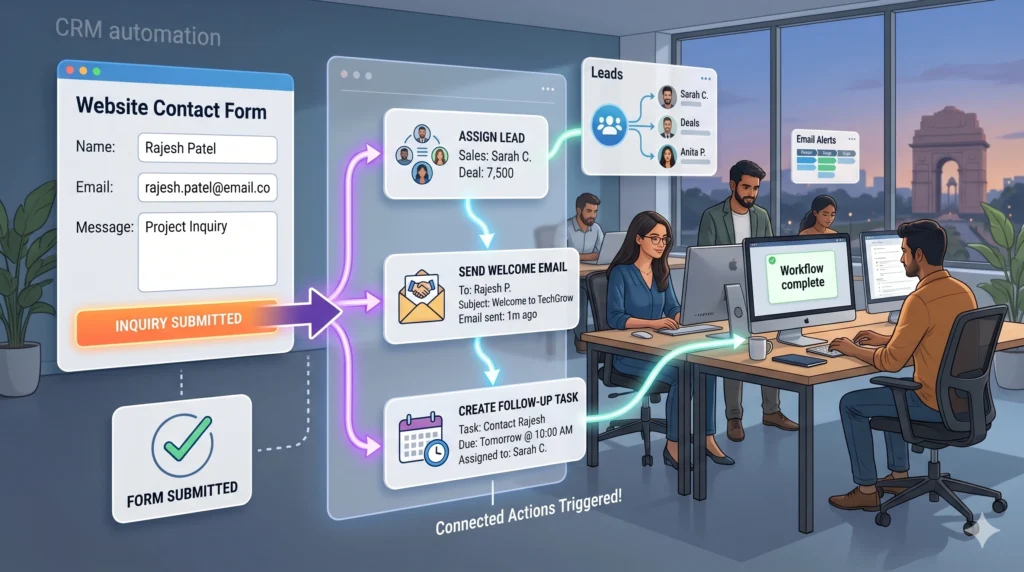
A visitor submits a form online. When there is no automated system, an employee must notice the entry by hand. That worker then enters the details into the customer database. One of the salespeople gets assigned to follow up. A greeting message goes out afterward. Should the office be swamped – or closed over a weekend – the contact could wait hours, even forty eight. In selling work, nearly fifty hours feels like forever.

One rule in Zoho CRM’s automation kicks off a chain: when a website form brings in a new lead, it lands with the next free rep – rotated fairly – and a welcome message fires out fast, under two minutes. From then on, silence follows action. A ping alerts the rep. The lead hears back without delay. No checklists needed. Nothing slips through gaps because the system handles each step like clockwork.
With the Professional plan, creating a Blueprint becomes possible – Zoho’s term for a step-by-step workflow where every phase has fixed actions. When a salesperson needs to send a proposal prior to advancing a deal into negotiations, the platform makes it mandatory. This sort of rule helps keep things consistent, especially when newer team members are learning how seasoned reps handle deals. Only after completing each checkpoint can progress continue forward.
Zia: Zoho’s AI Assistant
Zia, Zoho’s internal AI helper, actually does more now in 2026 compared to how it used to work. Found only on Enterprise and Ultimate subscriptions, you won’t get it with basic access – still, awareness matters. Despite skipping the budget tier, its role has grown into something noticeable.
Most times, deals follow familiar paths. Patterns in old records help Zia guess which ones will finish. When one contact tends to reply Tuesday mornings, it might be wise to reach out then. Instead of calling everyone at once, timing shifts per person. Sometimes numbers dip without warning. If wins fall off midweek, Zia speaks up before things get worse. Reports often hide slips until too late. This way, odd drops show sooner. Fewer surprises happen behind spreadsheets.
I want to be honest here. Zia is not magic. If your CRM data is messy or your team hasn’t been entering activities consistently, Zia’s predictions are going to be unreliable because the AI is learning from whatever data exists. It’s genuinely useful for teams that have been using the system long enough to have decent historical data. For a brand-new business just getting started, it’s mostly background noise until the data builds up.
Customization with Canvas
Start anywhere. Zoho CRM includes a tool named Canvas – no coding needed – to reshape its appearance for your team. Plain by default, the layout works fine yet lacks charm. A teammate without tech skills might shift which details appear on a contact page. Colors get swapped. Logos slip in. Suddenly it feels less like standard software, more like yours. How? By letting everyday changes build familiarity.
This matters more than it sounds. One of the most common reasons CRM adoption fails is that sales reps find the interface cluttered and annoying. When you can simplify the view to show only the ten fields that actually matter to your team and hide the forty that don’t, compliance goes up.
Zoho CRM Review 2026: Pricing Breakdown
Let me walk through the plans because this is where the best budget-friendly CRM argument either holds up or falls apart.
The free plan supports up to three users and includes lead management, contact tracking, a basic sales pipeline, a handful of workflow rules, mobile app access, and integration with other Zoho products. There’s no credit card required. For a tiny startup testing whether CRM software is even worth it, this is a genuinely useful way to get started without any financial commitment.
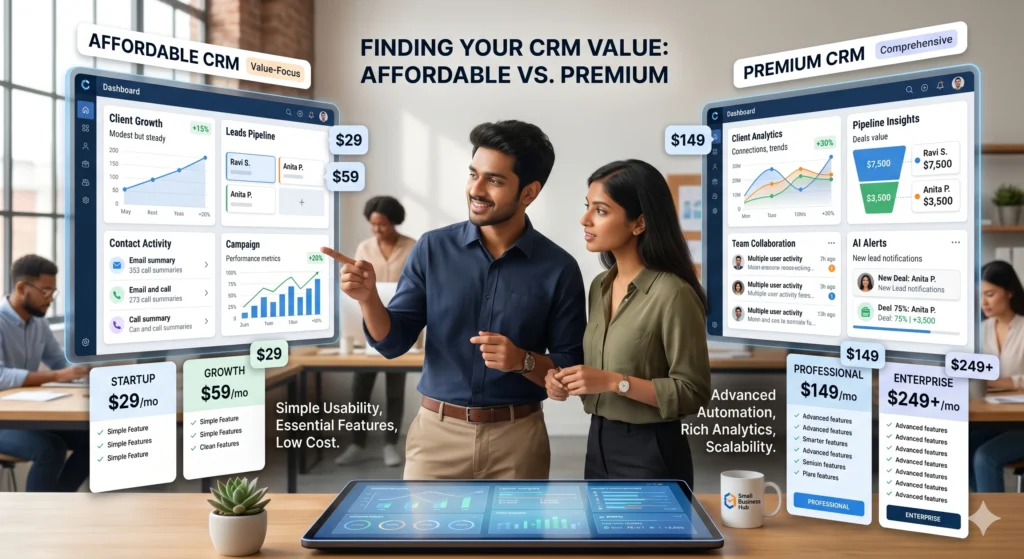
The Standard plan runs around $14 per user per month on annual billing. You get unlimited users, custom fields, territory management, web forms to capture leads from your website, email insights to see who opened what, and basic sales forecasting. The jump from free to Standard is significant in terms of what you unlock.
At $23 per user per month, the Professional plan is where most growing businesses land. It adds the Blueprint process management mentioned earlier, inventory management features, webhooks for connecting with other software, and more automation capacity. If your team is following a defined sales process and you want the system to enforce it, this is the minimum tier that makes sense.
Enterprise costs around $40 per user per month and adds Zia AI, multi-user customer portals, advanced customization options, and the ability to build custom modules for tracking things specific to your business. A real estate agency might build a Property module. A law firm might build a Case module. That level of flexibility is genuinely useful at scale.
Ultimate is the top tier at roughly $52 per user per month and adds enhanced analytics, higher API limits for developers, and more storage. Most small businesses never need this level.
Here’s something useful – monthly payments cost quite a bit extra compared to paying yearly, roughly 30% higher each month. When sticking with the tool long-term feels likely, going annual cuts expenses significantly.
Is Zoho One Worth Considering?
Priced at about forty five dollars monthly when billed yearly, Zoho One includes fifty plus Zoho applications in one package. Five bucks above the Enterprise CRM by itself – not much really. Need just desk support software or an accounting tool? Then adding those features through separate buys suddenly feels less logical. Crunching numbers first makes sense if extra tools are on the list. Surprise how fast savings pile up when everything fits under one roof.
What Actually Works Well in Zoho CRM
Let’s be specific because vague praise isn’t useful when you’re trying to make a real decision.
The email integration is solid. When you connect your business email account, emails you send and receive from leads and customers sync into their CRM record automatically. You can see the full conversation history without switching tabs. For a sales rep whose life runs through email, this is genuinely time-saving.
The mobile app is functional. If someone is at a client meeting and needs to pull up account details, add a note after the call, or log a task while walking to their car, the mobile app handles those tasks without issue. It’s not fancy but it works reliably.
Picture this. Reporting tools dig deep into what matters. Build dashboards revealing deal counts per rep across every pipeline phase. Notice how long proposals linger before advancing. Spot which leads convert best – referrals, cold calls, or something else. Charts? Sure. But they do more than decorate screens. A small business sees 60 percent of wins trace back to word-of-mouth, while ads bring in barely one out of twenty. That kind of clarity shifts direction. Numbers nudge change.
Where Zoho CRM Gets Frustrating
It’s true some frustrations stand out clearly. Though it works fine, the design feels old next to fresh CRMs like HubSpot or Pipedrive – both seem smoother, somehow lighter on their feet. First encounters with Zoho often bring confusion; too many pieces appear at once. Getting everything arranged right takes time, that much is certain.
Customer support on the lower-priced plans is limited to weekdays during standard hours. If something breaks on a Saturday afternoon before an important Monday presentation, you’re largely waiting for Monday morning to get help. Premium and Enterprise support with faster response times costs extra on top of the plan price.
The feature distribution across plans means you sometimes find yourself a plan or two above where you expected to land. A feature you assumed would be in Standard turns out to be Professional-only. This isn’t necessarily dishonest, but it does mean your initial budget estimate might need revising once you actually understand what your team needs.
How Zoho CRM Compares to Its Main Competitors
A look at Zoho CRM feels unfinished unless truth enters alongside contrast.
Zoho beats Salesforce hands down when it comes to cost. While Zoho Professional charges $23 per user each month, Salesforce Pro demands about $80 for similar tools. Most smaller companies find Salesforce packed with extras they do not need. What looks like power turns into wasted spending.
Compared to HubSpot, things get trickier. The free CRM from HubSpot gives a lot out of the box, plus getting around feels easier at first. Once upgrades come into play, though, costs jump fast. That Pro plan? It hits $100 monthly per person – about the same features as Zoho Enterprise, priced at just $40. Should your crew handle a bit more complexity during setup, going with Zoho adds up to major savings over time.
Zoho spreads wider than Pipedrive, even though many sales teams lean toward Pipedrive first. A smoother pipeline view? That edge likely belongs to Pipedrive. Yet when it comes to tools like automated campaigns, stock tracking, or tailored workflows – Zoho steps ahead without close competition. For pure simplicity in deal flow, Pipedrive may sit easier. When the job asks for more ground covered, Zoho delivers stronger value through built-in capabilities.
Who Should Actually Use Zoho CRM?
Truth is, this one weighs more than the rest. For small teams moving past spreadsheet chaos, Zoho CRM offers a solid central hub. If your company already runs on other Zoho apps, jumping in makes sense – linking them feels natural. Those who assign setup to someone patient tend to unlock its full shape. What sticks around afterward? A tool that bends slowly but holds form.
Most likely, this isn’t where you want to begin if getting started fast matters. Taking time pays off here. A teammate who likes fine-tuning systems? That kind of person will find room to work. When every member’s schedule is packed and the priority is quick results without hassle, easier options could go smoother. Patience shapes the experience.
Conclusion
Zoho CRM in 2026 builds trust by doing more than expected on a tight budget – its tools match heavier-priced rivals without the steep cost. A genuine free version works right away, built for actual use instead of show. Moving up, each paid level adds value where it matters. Growth feels smooth – from free into Standard, then onward to Professional – as needs evolve.
True, it’s not perfect. Clunky design shows up right away. Getting comfortable takes longer compared to others. Help when you’re on a basic plan? Harder to reach. Should things go off track without solid planning, a bigger package could become necessary. For companies willing to dig into details ahead of time, though, none of it poses a real obstacle.
If you’re comparing CRM tools and price sensitivity matters to your decision, Zoho CRM belongs on your shortlist. The 15-day free trial on paid plans and the permanently free plan for small teams mean you can test it without spending anything. Set it up with real data from your actual business, run it for two weeks, and see whether the way it organizes things matches how your team actually works. That hands-on test will tell you more than any review can.