
Imagine this. Three hours lost on LinkedIn, jumping from profile to profile, pasting emails into a sheet, feeding data into your CRM – only to find out too late that many addresses have gone stale. Not one actual outreach sent. Just paperwork wearing professional camouflage. This is daily life for countless salespeople, business developers included. Truly draining stuff.
This tool aims to shorten long sales cycles. Since 2015, it has helped teams find business clients more efficiently. In this look at LeadIQ in 2026, expect an honest breakdown – how it works, what users really appreciate, its weak spots, plus if it aligns with how you operate. Forget pushy pitches. The goal? A straightforward view so choices come easier, spending stays smart, effort isn’t lost on mismatched tools.
What Exactly Is LeadIQ and Who Uses It?
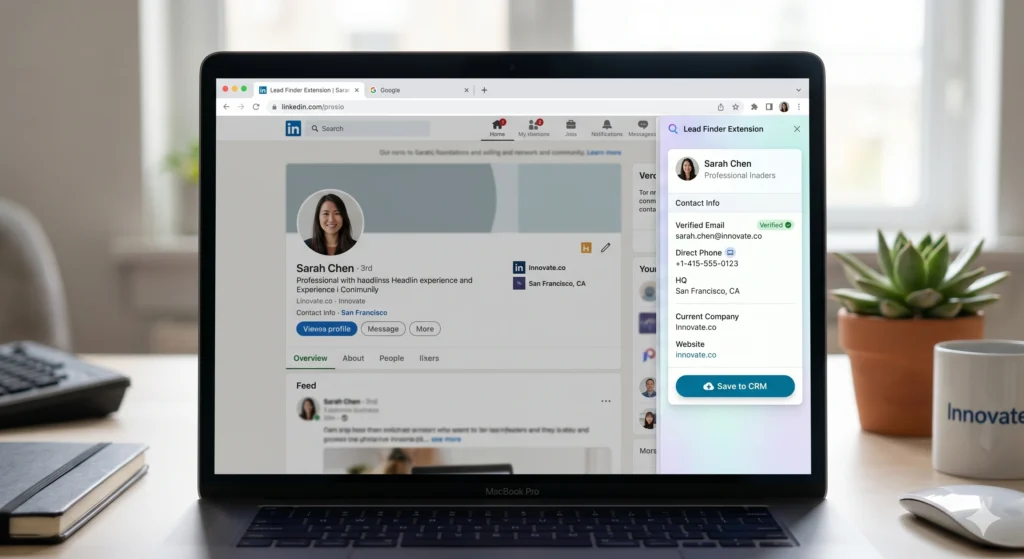
One click does it all – browsing LinkedIn, spotting a prospect, grabbing their info. The moment you tap Leadiq, details like email and role move quietly into your system. Instead of juggling windows, everything flows where it needs to go. Job titles, numbers, addresses – pulled without lifting a finger. No more copy-paste chains stretching across screens. It lives in your browser but acts like part of the page. Salesforce holds it later? HubSpot? Doesn’t matter. The path stays clear. You keep scrolling, while data slips behind the scenes into place. Seeing someone interesting turns into saved records instantly. Twelve open tabs fade into memory because one tool connects the dots now.
The people who use it most are SDRs (Sales Development Representatives) and BDRs (Business Development Representatives). These are the folks whose entire job is finding and contacting new potential customers. They live on LinkedIn Sales Navigator, they’re building contact lists constantly, and anything that shaves hours off that process is worth serious consideration to them.
But it’s not just for individual reps. Revenue operations teams use it to keep their CRM databases clean. Account executives use it to track when their old contacts move to new companies. Marketing teams use it to build targeted lists for campaigns.
Whatever system you run on – Salesforce, HubSpot, or even niche setups like Groove – it fits right in. Not another standalone piece floating apart, but something that hooks up quietly where things already move. Tools like Outreach and Salesloft? Already talk to it. No need to rip out what works just to make room. It slips behind the scenes, doing its part without demanding center stage.

LeadIQ Review 2026: The Core Feature That Makes It Worth Considering
The Chrome Extension (This Is the Whole Point)
Here’s how it goes. Spent time searching people by hand on LinkedIn? Then you’re familiar with the routine. Spot someone interesting. Visit their profile page next. Figuring out their work email comes after that. Company site gets checked soon afterward. Email pattern takes guessing – could be firstnamelastname@ or maybe initialdotlast@. Jotting each one down feels endless. Hundred more profiles wait quietly.
Right inside your browser, LeadIQ sticks to LinkedIn like a sidebar. Spot someone interesting? A tiny button appears on their profile. Hit that, suddenly their real email shows up, along with phone, job role, workplace. Everything flows straight into your CRM without delay. Less than five seconds pass before it is done.
What about doing this for a whole list at once? If you run a search in LinkedIn Sales Navigator and get a page of results, you can capture everyone on that page in one go. That’s a lot of time back. Real users across G2 and Capterra consistently mention saving around fifteen hours per week on data entry alone when they switch from doing it manually. That’s basically two full working days every week.
One SDR I came across in a review described his experience before LeadIQ like this: he was spending his first ninety minutes each morning just building his contact list before he could even start reaching out. After switching, that dropped to under twenty minutes. He still had to check the data occasionally, but the bulk of the boring work just disappeared.
Multi-Source Email Verification
Here’s something that makes LeadIQ a bit different from simpler tools. When it looks for your prospect’s email address, it doesn’t just check one database. It queries multiple data providers simultaneously (reportedly nine different sources) and then scores the email by confidence level. So instead of just giving you an email and hoping for the best, it tells you how confident it is that the email will actually work.
This matters because a high bounce rate on your emails can destroy your domain’s reputation, which means future emails start landing in spam. LeadIQ’s multi-source approach reduces bounces and helps keep your outreach deliverable.
That said, it’s not magic. If you’re prospecting into very niche industries or targeting really small companies, the data gets spottier. There are fewer public records to pull from, so the system sometimes comes up empty or returns information that’s a few months out of date.
LeadIQ Review 2026: Features Beyond Just Contact Capture
Champion Tracking (Job Change Alerts)
Surprise how smart this works. Watched by LeadIQ, your stored contacts trigger a notice the moment one shifts roles. Picture that chat you had half a year back with a VP from Company A – now they land at Company B. The update hits your inbox before you even check. What seemed quiet suddenly speaks up.
Why does that matter? Because someone who already knows your product, already had a positive interaction with your team, and is now settling into a new role at a new company is probably the warmest lead you’ll ever get. They already have some trust in you. They’re potentially evaluating new vendors for their new employer. Reaching out at that exact moment, instead of months later when they’re already locked into contracts, is a meaningful advantage.
Multiple reviewers on G2 specifically called this out as one of the more valuable features in the entire tool. One account executive mentioned closing a deal specifically because LeadIQ flagged a job change and they reached out within the first week of the person starting their new position. That kind of timing doesn’t happen by accident when you’re managing hundreds of contacts.
Scribe: The AI Email Writing Assistant
LeadIQ has a tool called Scribe that writes emails using details about a person and their company. With info in hand, it creates messages tailored to each recipient. Starting from nothing gets tiring – more so if sending many daily. That’s where automated help makes the task lighter without losing personal touch. Fewer empty screens, more replies that feel human.
Starting out feels easier when you have something already there. Many people selling things struggle most with the very first line, yet Scribe takes care of it. Instead of facing an empty page, now there’s a version waiting – one you can adjust instead of building alone.
Truth is, it isn’t flawless. Scribe tends to produce text that lacks character. What comes out sometimes reads like something pieced together, not crafted. Multiple users have said the drafts demand serious reworking before they’re ready to hit send. A single person said it straight – when you drop Scribe’s result right into a message untouched, the reader might just feel something feels strange. Think of it like raw material instead of something ready to serve.
AI Account Prospecting
Starting with what matters most – finding the right businesses – Leadiq steps in before you even look at profiles. Instead of guessing, it highlights organizations based on details you care about: field of work, number of employees, tools they use daily. Once those points are defined, matches begin appearing, aligned closely with who you aim to reach. The whole process shifts focus from random searches to targeted discovery.
Most teams using account-focused selling will get by just fine. Some people point out the advice doesn’t quite hit the mark in niche areas. When your audience is narrow, what gets suggested often feels too general. You’ll likely spend extra time sorting through results before finding anything worth acting on.
LeadIQ Pricing in 2026: What You’re Actually Looking At
LeadIQ runs on a credit-based model, which is worth understanding before you commit.
The free plan gives you fifty verified emails and five phone numbers per month, plus forty AI-generated emails through Scribe, and the ability to track up to ten accounts. That’s enough to test whether the data quality works for your particular target market. Most people who do real prospecting hit that limit pretty quickly, but it’s a legitimate way to try before you buy.
The Essential plan runs around $36 to $45 per user per month when billed annually. You get up to 1,000 emails and fifty phone numbers per month, plus access to the CRM integrations.
The Pro plan starts around $200 per month and is where you get higher credit volumes, more advanced features, and better support options. Enterprise pricing is custom and requires a conversation with their sales team.
What surprises most folks? Credits vanish once the billing cycle ends. Hit a quiet patch – holidays, staff shifts – and whatever is left disappears. Some users noted they burned through their entire allowance by the 15th. After that, progress halts. Moving up mid-month is one path. Pausing outreach waits for reset day. Lower-priced tiers won’t let you grab just a handful more credits. Runs thin when you’re inches from completing your target.
Most people do worry about credit problems – yet those worries shrink when there is a clear routine. People who open LeadIQ daily face less frustration compared to groups skipping days without reason. What matters shows up in the rhythm, not just the tool.
Where LeadIQ Genuinely Struggles
Phone Number Accuracy
Most feedback points to one issue again and again. Being clear matters here. When it comes to phone details, LeadIQ often falls short compared to its email accuracy. Outdated digits show up frequently. Sometimes a number links to another individual sharing a name, yet not the right contact. Now and then, calls go through to private mobiles rather than office extensions.
For teams that rely heavily on cold calling, this is a real problem. Every bad number is a wasted call and a rep’s time burned. Some users called it a dealbreaker specifically for call-heavy outreach workflows.

Email accuracy tends to hold up better, particularly for companies that are well-documented online. Phone data is inconsistent, and you should factor that in if calling is a major part of how your team operates.
International Coverage Is Uneven
LeadIQ works well for US-based targets. Coverage in EMEA is described as improving but still notably weaker in terms of verified phone numbers. Latin America, according to at least one enterprise user on G2, actually holds up fairly well for email data. But if your prospecting is heavily international, you might find yourself hitting dead ends more often than you’d like.
HubSpot Integration Has a Friction Problem
With HubSpot, the connection uses a middle platform named Workato. So now there’s more distance between LeadIQ and your CRM – problems mean checking both tools, not just one. A few users reported delays fixing sync errors tied to permissions. Organizations leaning hard on HubSpot’s security may need extra time during setup to make things work smoothly.
Wrong account assignments pop up now and then, even though connecting to Salesforce feels straightforward. Sometimes duplicates slip through despite LeadIQ’s built-in checks meant to catch them.
It Doesn’t Do Sequencing or Dialing
LeadIQ finds and captures contact data. It doesn’t send your emails. It doesn’t make your calls. It doesn’t manage your outreach sequences. For all of that, you need separate tools like Outreach, Salesloft, or Instantly for email, and something like Nooks or Orum for calling.
That’s worth factoring into your budget. LeadIQ makes your stack more efficient, but it adds to the number of tools you’re paying for without replacing any of them. For small teams watching every dollar, that’s a real consideration. You’re not replacing a tool; you’re adding one.
LeadIQ vs. Alternatives: The Quick Honest Take
Most folks think of LeadIQ alongside Apollo.io, though some pair it with ZoomInfo instead. Others link it to Lusha, especially when digging for contact details. A few mention Cognism, usually after testing both. Each match comes up depending on what features matter at the time.
Most of the time, starting out costs less with Apollo because their free level gives more. Built-in sequence features mean one less service to pay for elsewhere. When your target audience shows up clearly in their system, cutting extra bills gets easier. Smaller groups tend to stretch each dollar further here.
Price-wise, ZoomInfo sits in its own category. Think big-company tools with big-company costs – usually about fifteen grand each year. That means most of the people checking this out won’t find it an apples-to-apples match.
Lusha skips the complexity, costs less – ideal when you need just a few contacts now and then instead of constant outreach. While bulk searches demand more power, this tool fits lighter needs without extra expense.
When teams target Europe, Cognism comes up a lot – their numbers are checked by phone, which helps.
LeadIQ shines through its browser add-on when used on LinkedIn. Smooth moves between steps make the process feel natural, while updating contacts happens fast and works every time. Following key people gets easier thanks to a tool few budget options handle right. When reaching out on LinkedIn matters most – especially if Salesforce or HubSpot runs your system – this tool slips into place more neatly than others around.
What the Setup Process Actually Looks Like
This part gets skipped in a lot of reviews, and it’s worth covering because the first few days with a new tool can make or break adoption.
Getting started with LeadIQ is genuinely simple. You create an account, install the Chrome extension, and connect it to your CRM. The Salesforce connection is the more direct option. You authenticate through OAuth, pick your field mappings, and you’re basically done. Most reps are capturing leads within an hour of signing up.
The HubSpot connection takes longer. Because it runs through Workato, you’re setting up a workflow automation connection rather than a direct integration. Someone familiar with connecting software tools will get it sorted in an afternoon. Others have needed help from LeadIQ’s support team, and response quality tends to vary. Some reviewers say they got replies within hours. Others mention waiting a couple of days. The 24/7 Slack support on enterprise plans is consistently praised, but that’s not available on entry-level tiers.
Once it’s running, new reps pick it up fast. The interface is focused enough that there isn’t much to learn. The extension shows up, you click a button, you review the captured data, you push it to your CRM. Experienced SDRs can usually explain it to a new teammate in under ten minutes.

How LeadIQ’s Credit System Works Day to Day
The credit model is worth understanding in real operational terms, not just in pricing page terms.
Each plan gives you a monthly allotment of “verified email” credits and a separate allotment of “phone number” credits. When you capture a contact, you spend a credit. When your credits are gone, you can’t capture more until the cycle resets or you upgrade.
What makes this slightly frustrating is that different data types cost different amounts. A basic verified work email costs less than a mobile phone number. So if your reps prioritize phone outreach, they’ll burn through phone credits much faster than email credits. A team of five reps doing serious call volume can exhaust their phone credits in a week or two on a mid-tier plan.
LeadIQ rolled out a Universal Credits system in late 2025 that helps with this. Instead of completely separate pools for different data types, you draw from a single credit pool usable across prospecting, enrichment, Scribe, tracking, and API usage. That flexibility matters for teams whose needs shift from month to month.
Credits expiring at cycle end still remains a friction point though. No carryover means a slow week costs you. Teams that know this going in tend to plan their prospecting calendar more deliberately, which isn’t a terrible habit, but it’s a constraint competitors like Apollo don’t impose the same way.
Real Talk: Who Should Actually Use LeadIQ in 2026?
LeadIQ makes the most sense if you check most of these boxes: you do a lot of LinkedIn prospecting, your primary market is US or EMEA, your team already uses Salesforce or HubSpot, and you want to reduce the time reps spend on data entry.
It’s a genuinely strong tool for mid-market SDR teams running consistent outbound volume. The time savings are real. The champion tracking adds pipeline value. The data quality on emails is solid for well-documented companies.
You should probably look elsewhere if your outbound motion depends heavily on cold calling (because the phone data is too inconsistent), if you’re HubSpot-first with tight security requirements (because the Workato integration adds headaches), or if you’re a very small team that can’t afford another subscription on an already stretched budget.
The free plan is worth trying. Fifty emails isn’t a lot, but it’s enough to know whether the contact data quality works for your specific target market before you spend anything.
LeadIQ Review 2026: Final Verdict
This LeadIQ Review 2026 covers a tool that’s been around for over a decade, and it hasn’t survived that long by accident. The Chrome extension is legitimately one of the smoothest lead capture workflows available. The CRM integrations work. The champion tracking feature catches opportunities that most reps would miss entirely. And the free plan lets you test it without risk.
But it’s not a complete outbound solution. It’s a data capture and enrichment tool. The phone number reliability issues are documented and consistent enough that you shouldn’t ignore them. The credit expiry model causes friction for teams with uneven prospecting schedules. HubSpot users will likely run into at least one integration headache.
If you’re evaluating LeadIQ for your team, start with the free plan. Use it against your actual target accounts, not just a generic test. See if the emails hold up. If you’re call-heavy, ask to see their phone number accuracy rates for your specific geography before you commit to a paid plan. And build a realistic budget that accounts for the other tools you’ll still need alongside it.
LeadIQ fits a specific kind of team well. Whether that’s your team is something a two-week free trial will tell you more clearly than any review can.