
Imagine this. Every morning, a salesperson at a tech startup dives into LinkedIn, then flips to ZoomInfo, wrestles with a clunky spreadsheet, then hunts through an odd email tool. It takes them four hours just to gather 50 solid leads – real names, working emails, proper job titles. When that stack is finally done, so is most of the workday’s first half. This isn’t selling. It’s cleaning up messy information. Many B2B teams repeat this grind without pause, each day like the last.
Picture shifts entirely with clay. Lately, chatter about it has exploded among folks in B2B sales circles – especially in those lively Slack threads and RevOps hangouts where new tools get dissected fast. What’s behind all the noise? Behind its screen sits a tool promising smarter data, though picking it up means wrestling steeper setup effort plus ongoing costs per use. Depends on your role whether it pays off or just adds clutter. Worthwhile for some. Overkill for others.
Here’s everything spelled out simply. What Clay offers comes next, followed by how its artificial intelligence boosts data. Pricing details appear later, so expectations stay realistic. One thing leads to another until the full story shows up. Clarity matters more than promises here. The last bit ties it together without pushing anything.
What Is Clay and Why Is Everyone Talking About It?
Picture a tool made for sales folks who work with businesses. It fills gaps in data and runs tasks automatically. Think of it like a sheet filled with rows and columns – but smarter. Instead of static text, every column has power. One might pull up an email on its own. Actions live inside cells. That changes everything. A person looks into which programs the business runs. Someone else leans on an AI helper to craft a tailored first sentence for your message, pulling details from a recent article the target shared online.
Here’s how it works. Drop a rough list of business names or people into Clay – suddenly each entry grows sharper, checked and filled out with real details that make reaching out possible.
Back in 2021, the system started out modest – just a basic way to enrich data. Over time, though, it expanded, picking up depth along the way. By 2026, its reach stretched wide: three hundred thousand teams worldwide now rely on it. Some are lone consultants managing outreach for a single account; others form entire revenue operations units inside large software firms.

Why B2B Sales Teams Have a Data Problem
Before getting into what Clay specifically does, it’s worth understanding why AI data enrichment tools for B2B sales exist at all.
The core issue is this: most companies already have some form of lead list or CRM, but the data in those systems is messy and incomplete. Someone signed up for a webinar two years ago but their job title has changed. A company’s LinkedIn page says 200 employees but they’ve actually grown to 600. An email address is listed but it bounced three times. A prospect’s company recently raised a Series B round, which means they’re probably hiring and spending, but nothing in your CRM flags that.
Sales reps either spend time manually tracking this stuff down, or they send irrelevant outreach to the wrong people at the wrong time. Both outcomes are bad.
That’s the problem Clay is built to solve.
How Clay’s AI Data Enrichment Actually Works
Most tools store their own contact details, but Clay works differently. Rather than keeping a fixed collection, it taps into more than 150 separate sources each time you search. Because it gathers fresh results from so many places at once, missing data isn’t tied to just one provider. Information comes through multiple pipelines, reducing blind spots automatically.
Here’s roughly how the process works in practice.
You start with what Clay calls a “table.” It looks like a spreadsheet. You upload your raw lead list, or you use Clay’s search features to define the kind of companies and contacts you want. Then you build columns that enrich each row. Those columns can pull verified emails, job titles, company revenue estimates, tech stack data, hiring signals, recent news, funding information, and a lot more.
Waterfall Enrichment: The Feature That Actually Matters Most
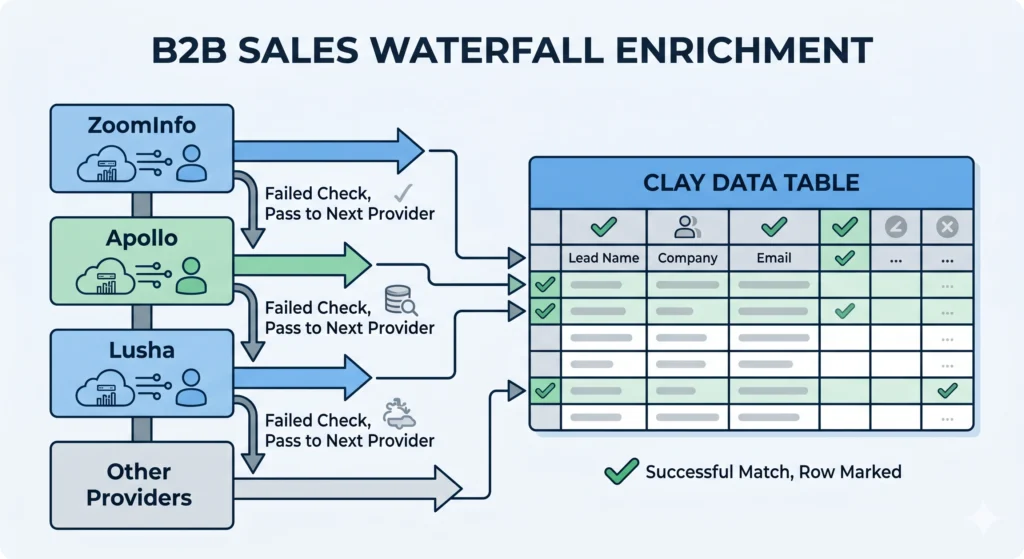
One of Clay’s most genuinely useful features for B2B sales is what it calls waterfall enrichment. Let me explain how that works because it’s the part that makes Clay different from just picking one data vendor.
Say you want to find a verified email for each contact in your list. Any single provider, whether that’s Hunter.io, Apollo, or Prospeo, might only find emails for 40 to 60 percent of your list. That’s not great coverage.
With Clay’s waterfall approach, you stack providers in order. If Provider A doesn’t find an email for a row, Clay automatically checks Provider B. If that also fails, it checks Provider C. You only get charged a credit if a provider actually finds something. A well-set-up waterfall with three providers can push email coverage up to 70 to 85 percent on a typical B2B contact list.
That difference matters a lot if you’re running outbound at scale.
Claygent: The AI Research Agent
This is the part that gets genuinely interesting and also, honestly, a little complicated.
Claygent is Clay’s built-in AI research agent. You can give it a task in plain English, and it goes off and finds structured data from public sources across the web. Things like: “Check if this company recently posted any SDR job openings.” Or: “Find the founder’s LinkedIn bio and summarize their background.” Or: “Look for any recent press mentions of this company in the last 90 days.”
Now one task takes seconds instead of twenty minutes each. A machine handles piles of data without help. Mistakes still pop up here and there. Later on, we will touch on where it falls short. Personal messages go out fast when done this way. Most grunt work fades into the background.
Here’s a detail often missed: Claygent eats up credits quickly, particularly with tough jobs. Each line could cost between 10 and 50, based on the request. Planning ahead helps avoid surprises later.
Sculptor: Describing Workflows in Plain Language
Start typing how you’d explain it to a friend. That’s what Sculptor understands – plain talk instead of complex queries. Say you’re after B2B SaaS firms using Salesforce, sized between fifty and two hundred people, bringing on sales staff now. Instead of building spreadsheets by hand, the system sets up your data structure without extra steps. Rows appear, fields fill, all shaped around your words.
This is helpful if you’re not technical, though getting truly useful results still requires some understanding of how the underlying data providers work.
The Waterfall, The Signals, and the Full Picture
Something that separates the best AI data enrichment tools for B2B from basic list-building is the idea of buying signals. Finding a company and getting their contact details is one thing. Knowing that company just raised funding, or their VP of Sales just changed, or they posted four SDR job listings this week, that information tells you when to reach out.
Out there, things shift fast. Clay mixes real-time signals with clear purpose inside your outreach steps. Instead of pulling a fixed group and sending messages to each name the same way, you shape a live list – always adjusting based on what target firms are really doing right now.
A team I read about was targeting mid-market logistics companies. Instead of hitting every company in their database monthly, they set up Clay to flag companies that had recently posted hiring activity in their operations team. That signal narrowed the list considerably and the emails they sent were far more relevant because they were timed to something real.
That’s the kind of workflow Clay makes possible. It’s not the only tool that can do this, but it does it in a no-code environment that most non-technical sales operators can eventually learn.
Clay Pricing: What You’re Actually Paying For
Here’s the thing – costs tend to catch folks off guard. Staying sharp about them makes sense.
Most teams get full access without extra fees per person. Credit system powers Clay instead of individual licenses. Larger groups benefit because nobody gets left out. Access stays open for every member who needs it. The cost ties directly to how many enrichment tasks are completed.
Some tasks take just a few credits. A simple email search uses one to three. Starting a Claygent process on one entry? That runs between ten and fifty. When several data boosts stack on one profile, fifteen credits may vanish even before outreach begins.
Starting at roughly $149 each month, the base option handles about two hundred to four hundred enhanced contacts, give or take, based on how deep the data layering goes per entry. Beyond that, higher tiers offer expanded capacity.
A two-week peek at Pro tools comes included, no cost. That stretch lets you see if your plan actually works in practice before deciding to stay. Worth trying just to check how things feel day by day.
Watch this: AI credits add up quicker than most think. Start by sketching your full process. Figure the cost per data line. Then tack on your usual month-to-month load – do that well ahead of choosing any package.

How It Compares to Per-Seat Tools
Most small teams doing lots of data updates find Clay saves money compared to ZoomInfo or Cognism. While those platforms bill yearly per person, sometimes costing thousands each, Clay uses credits instead. One shared login among five workers cuts costs sharply under heavy use. Pricing tilts toward Clay when volume rises but staff stays lean.
Costs stay steady each month when pricing follows the number of seats. A sudden jump might show up on your Clay invoice after an active campaign, especially if credit monitoring slips. Predictability takes a hit in that case.
Who Actually Gets Value From Clay?
Here’s where things get real. Sure, Clay works well – yet it won’t fit every person who tries it.
Most groups seeing strong results share certain traits. Running outreach campaigns at serious volume is typical – think multiple hundreds or even thousands of prospects monthly, far beyond small batches. A dedicated person investing honest hours into mastering the system makes a difference. People new to the tool often say comfort comes after several weeks of steady use. Instant mastery rarely happens.
Smaller groups focused on basic email lists might find simpler tools more practical than powerful ones. Tools such as Apollo often do the job at a lower price. When you mostly want clean contact data, fewer features mean less hassle. The depth of Clay makes sense only if your work demands fine control. Without that need, extra options just get in the way.
The teams that seem to use it most successfully are RevOps leads at SaaS companies, outbound-heavy agencies, and growth teams running account-based marketing programs. They’ve often already burned through simpler tools and needed something that could handle more nuanced workflows.
The Learning Curve Is Real
I want to be clear about this because the demos make it look easy. Clay’s interface genuinely is intuitive at first glance. It looks like a spreadsheet. But once you start building multi-step workflows with conditional logic and waterfalls and Claygent tasks, things get complicated.
One review I came across from a TrustRadius user said their team took two to three weeks to really get comfortable building workflows. That’s probably about right for someone with moderate technical comfort. Less technical users might take longer.
There’s a Clay Slack community that people mention often, and the company has built out a lot of educational content. That helps. But go in expecting a learning investment, not an instant win.
What Clay Doesn’t Do (And What You Still Need)
Here’s something a lot of articles about Clay skip over, and I think it’s worth being upfront about.
Clay enriches data. It doesn’t send emails. It’s not a CRM. It doesn’t manage your pipeline.
If you want to actually reach out to the prospects Clay has enriched, you’ll need a separate email sending tool like Lemlist, Instantly, or Smartlead. Those cost anywhere from $37 to $137 per month per user depending on what you need. Clay integrates with all of them, but you’re still paying for two platforms.
Similarly, Clay’s enriched data is designed to push into your CRM, whether that’s Salesforce or HubSpot, for actual pipeline management. The tables in Clay are not a substitute for your CRM.
Some users find this frustrating. Others see it as a clean separation of concerns, where each tool does what it does best. Whether it’s a problem depends on how your stack is already set up.
One other thing worth noting: data accuracy varies. Clay’s waterfall approach genuinely improves coverage, but some of the underlying providers occasionally return outdated information, especially for smaller companies and startups that don’t have much of an online footprint. Email accuracy tends to be strong when the waterfall is well-configured. Company firmographic data for smaller or private companies can be inconsistent.
Best AI Data Enrichment Tool for B2B: How Clay Stacks Up
If you’re looking at the broader category of AI data enrichment tools for B2B and trying to figure out where Clay sits, here’s a fair summary.
Clay has the widest coverage through its multi-provider model. No single provider matches the breadth you get when you chain 150 sources together with a well-built waterfall. For teams that need high match rates on contact data, that’s a real advantage.
The Claygent feature puts Clay in a different class from simple enrichment tools. The ability to run open-ended research tasks at scale, pulling specific data points from websites and job postings and news articles, is genuinely hard to replicate with other tools without writing custom code.
The credit model is both Clay’s strength and its complication. Lower total cost is possible, but it requires careful workflow design. Unmanaged credit consumption is a common pain point that users mention in reviews.
For teams that already have a functional outbound motion and want to level up the quality and personalization of their data, Clay is the most flexible option available in 2026. For teams that are still figuring out their ICP and sales process, starting with a simpler tool and coming back to Clay when you’re ready for more sophistication is the more practical path.

Conclusion
Clay has genuinely earned its reputation as one of the best AI data enrichment tools for B2B sales available right now. The waterfall enrichment approach, the Claygent AI research agent, the signal-based workflows, and the flexible multi-provider architecture give it capabilities that simpler tools can’t match.
Still, this isn’t something you just turn on and walk away from. Anyone claiming it is likely skipping past how much there is to learn and how credits really add up. Those who gain actual benefit tend to begin with clear goals, spend time getting familiar with the system, then monitor usage right from day one.
Start your look at Clay for business sales tools in 2026 using the two-week trial. Before diving into options, sketch a clear path forward. Try this: pull five hundred firms from Apollo, locate real email addresses for each company’s VP of Sales, scan their recent job posts for signs of expansion, then draft a short custom note for every lead. Go through that process. Notice the credit use, track how much time setup demands. This hands-on run teaches far more than reading feedback ever could.
The best AI data enrichment tool is the one that fits what you’re actually trying to do. For a lot of B2B teams operating at scale in 2026, that tool is Clay. For others, a lighter solution with a lower learning curve will get you further faster. Knowing which camp you’re in before you commit is the most useful thing you can take from this.
If you want to learn how to experiment with AI prompts and build with Gemini, check out this beginner‑friendly guide:
Google AI Studio: A Beginner’s Guide to Building with AI – SaaslyAI