Imagine you’re a teacher, knee-deep in lesson plans, trying to make fractions exciting for a room full of fifth graders. Or maybe you’re a marketer, racing to whip up a product demo that doesn’t bore your audience to tears. Either way, you need a tool that’s as easy as flipping a pancake but powerful enough to make your content pop. Enter Screencastify, the free screen recorder that’s like having a film crew in your browser. In 2026, this little gem is changing the game for education, marketing, and sales, and I’m here to tell you why it’s your new best friend.
Screencastify, found at screencastify.com, is a screen recorder for laptop extension that works like magic on Windows, Mac, and Chromebooks. No need to install hefty software or watch hours of tutorials to figure it out. It’s used by over 70% of U.S. school districts to record videos that make learning stick, and it’s just as handy for marketing pros crafting demos or sales reps pitching deals. T
This article is your deep dive into Screencastify’s world, its features, its impact, and why it’s the screen recorder for Windows (and more) that you’ll wish you’d discovered sooner.
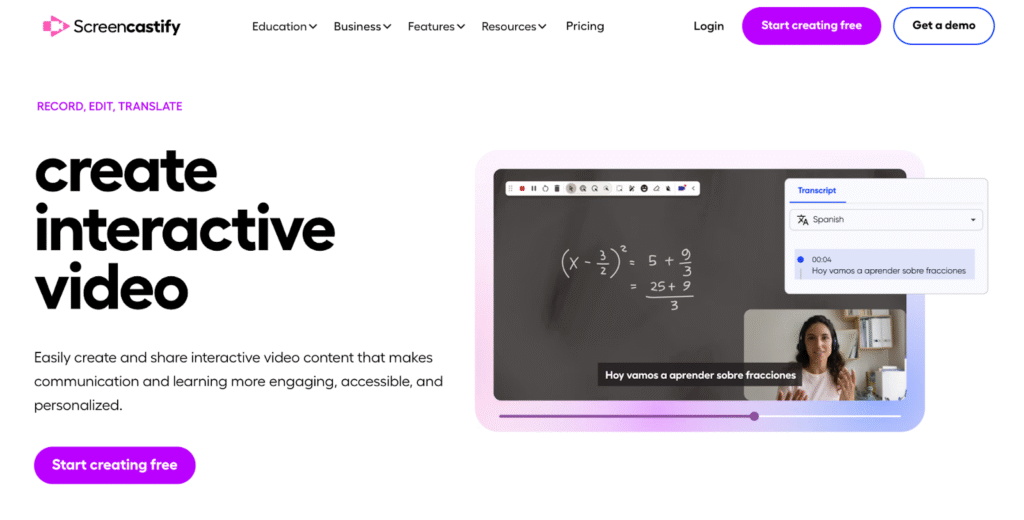
What’s the Deal with Screencastify?
Think of Screencastify as your go-to tool for turning ideas into videos without the headache. It’s a Chrome and Edge extension that lets you record videos, edit them like a pro (without the pro-level stress), and share them faster than you can say “action!” Its core trio Record, Edit, and Submit makes it a one-stop shop for anyone who needs to create interactive video content.
In the classroom, teachers use it to flip lessons, collect student videos, or explain tricky concepts. In the business world, marketers and salespeople use it to craft demos, train teams, or win over clients. With integrations like Google Drive and Google Classroom, it’s a breeze to share your work, whether you’re teaching kids or pitching a product. And the best part? The free version is robust enough to get you started, while paid plans unlock extras for those who live and breathe video creation.
Screencastify’s Features: The Nuts and Bolts
Let’s get into the good stuff that makes Screencastify tick? Its features are like tools in a carpenter’s belt: each one has a purpose, and together, they build something amazing. Here’s a close look at how they power education, marketing, and sales in 2026.
1. Recording That Feels Like a Breeze
Screencastify’s recording options are as flexible as a yoga instructor. You can:
- Capture Your Whole Desktop: Great for showing off software, like a teacher walking through a coding lesson or a marketer demoing a CRM tool.
- Record a Single Browser Tab: Perfect for focused content, like a tutorial on a web app without desktop clutter.
- Record with Your Webcam: Personalize your media by putting your face in the game, either a full-screen or a picture-in-picture overlay will do.
Its free screen recorder spews out high-definition-level videos that are easy on the eye, be it to teach algebra or demonstrate a new device. There is the opportunity to narrate using your microphone, while the real-time tools allow you to emphasize the important things including a pen to scribble notes, or a spotlight to point out important areas. Just imagine that science teacher circling specifics of a cell diagram or a salesperson highlighting a product killer feature in the middle of the recording.
The free version caps you at 10 videos, each up to 30 minutes. That’s plenty for most folks, but if you’re churning out content like a YouTube star, the Starter or Pro plans give you unlimited recordings and longer runtimes, perfect for marketing campaigns or sales pitches.
2. Editing That Won’t Make You Cry
Editing videos can feel like untangling Christmas lights, but Screencastify’s editor is more like sipping coffee on a sunny porch. It’s built for regular people, not just video nerds. Here’s what you get:
- Trimming: Cut out that awkward “uhm” at the start or the part where your cat jumped on the keyboard.
- Annotations: Add text, arrows, or shapes to drive your point home. A teacher might label a graph; a marketer might highlight a “Buy Now” button.
- Multiclipping: Take several takes at a time and make one smooth video, just as you stitch together a quilt.
- Cropping and Zooming: zoom up on a graph or crop the distractions and keep it in the spotlight.
- AI-driven Captions: Create video captions that can be read in more than 100 languages so viewers around the world, including students in Tokyo and clients in Sao Paulo can enjoy your video.
The education field is a godsend because a lecturer may have to edit a speech to make sure that children will not get bored, and marketing, when a well-polished demo must impress without extensive tuning.
3. Interactive Questions: Making Videos a Conversation
This is where it gets spicy! That feature of screencastify is Interactive Questions. You can also insert quizzes, either multiple-choice, short answer or true/false, directly into your videos and make watching it active. This is the way it works:
- In Education: A history teacher might ask, “Who signed the Declaration of Independence first?” to keep students on their toes. The analytics show who got it right, helping spot who’s struggling.
- In Marketing: A company could add, “Which feature excites you most?” to a demo, gathering insights on what customers care about.
- In Sales: A rep might ask, “Does this solve your problem?” to gauge a prospect’s interest.
The analytics dashboard tracks responses and watch time, so you know exactly how your audience is interacting. It’s like having a chat with viewers, even when you’re miles away.
4. Sharing That’s as Easy as Pie
Sharing videos with Screencastify is like passing a note in class quick and simple. Videos save to Google Drive automatically, and you can generate links with permissions like view-only or edit access. Integrations include:
- Google Classroom: Teachers can share lessons or assignments, with analytics to see who’s watched.
- YouTube for Education: Export to an ad-free platform for broader reach, great for flipped learning.
- LMS Platforms: Works with Canvas and Schoology, making it a teacher’s dream.
For marketing and sales, you can export as MP4s, GIFs, or MP3s for podcasts. A marketer might drop a GIF into a TikTok post, while a sales rep could email a pitch video with analytics to track when it’s viewed. It’s all about getting your message out there, fast.
5. The Submit Feature: A Classroom Superpower
The Submit feature is like a magic wand for teachers. It lets you create assignment links so students can record videos and submit them from any device with no account needed. Think:
- Language Classes: Students record themselves practicing German, letting teachers check pronunciation.
- Presentations: Kids submit video projects, easing nerves for shy speakers.
- Reflections: Students record their thoughts on a book or experiment, showing their learning in a new way.
In marketing, this feature can collect customer testimonials or feedback videos, adding a human touch to campaigns. It’s a simple way to get others involved in your story.
6. Accessibility and Security: No One Left Behind
Screencastify takes inclusivity and safety seriously. Its AI-powered captions support over 100 languages, so a student in Mumbai or a client in Paris can follow along. Compliance with SOPPA, FERPA, and COPPA means schools can trust it with student data. For businesses, encrypted Google Drive storage keeps your videos locked down tight.
This focus makes Screencastify a champ for education, where accessibility is key, and marketing, where reaching global audiences matters.
7. Analytics That Give You the Inside Scoop
Screencastify’s analytics are like a backstage pass to your videos. You can see:
- Who’s Watching: Track view counts to know your reach.
- How Long They Watch: Find out if viewers are bailing early or sticking around.
- Question Responses: See how people answer your interactive questions.
This is a goldmine for teachers checking student engagement, marketers gauging campaign success, or sales reps timing their follow-ups. It’s not just about making videos it’s about making them count.
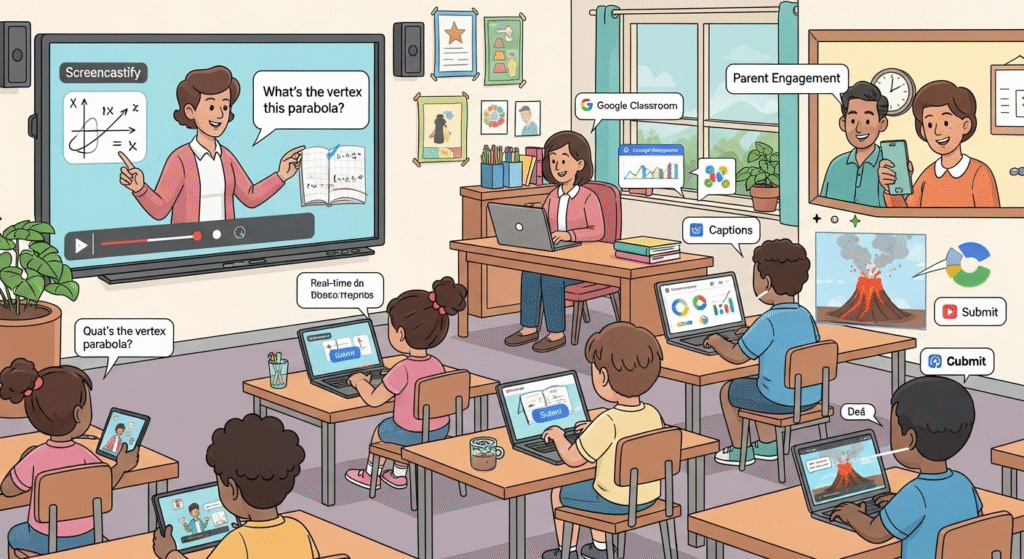
Screencastify in Education: Lighting Up Classrooms
Screencastify is a rockstar in education, helping teachers and students connect in ways that make learning fun and effective. Here’s how it’s shaking things up in 2026.
1. Flipping the Classroom Like a Pro
Flipped learning means students watch lessons at home and use class time for hands-on work. Screencastify makes this a cinch. A math teacher might record a video on quadratic equations, drawing on the screen to show each step and adding a question like, “What’s the vertex of this parabola?” Students watch, answer, and come to class ready to tackle problems together.
Google Classroom integration means assignments go out with one click, and analytics show who’s watched (or who’s been binge-watching cartoons instead). It’s a game-changer for keeping everyone on track.
2. Teaching That Fits Every Kid
No two students are alike, and Screencastify lets teachers meet them where they are. A reading teacher might record a basic phonics lesson for struggling readers and a deeper analysis of To Kill a Mockingbird for advanced students. Captions in languages like Spanish or Mandarin help English Language Learners keep up. Analytics show who’s engaging, so teachers can adjust their approach.
3. Letting Students Shine
The Submit feature turns students into video creators. A shy kid might record a book report instead of presenting in front of the class, building confidence. A Spanish student could submit a video practicing verb conjugations, giving the teacher a clear view of their progress. It’s a way to let every student’s voice be heard, literally.
4. Training Teachers Without the Hassle
Professional development can be a slog, but Screencastify makes it painless. A principal might record a video on new classroom tech, letting teachers watch when it suits them. The Submit feature lets teachers record their own lessons for feedback, fostering growth without pricey workshops. Schools save up to 25% compared to in-person training, and teachers love the flexibility.
5. Bringing Parents into the Loop
Teachers can record videos to keep parents in the know. A first-grade teacher might share a video of kids building a volcano, or a high school teacher could explain the new history curriculum. These quick screencasts make parents feel like part of the journey, not just spectators.
6. Making Learning Accessible
Based on this, Screencastify captions and translations make sure that no student will be left behind. A hearing impaired student is able to track a lecture as it is being given with the help of real-time subtitles and a non-native speaker will receive the captions in his native language. When schools use accessibility guidelines such as WCAG, they remain on the right side of the law and assist all of the children to learn.
Screencastify in Marketing and Sales: Winning Customers Over
Screencastify isn’t just for teachers it’s a secret weapon for marketing and sales teams looking to stand out in 2026. Here’s how it’s making waves.
1. Demos That Don’t Bore
A great demo can seal the deal, and Screencastify makes them shine. A startup might record a video showing off its app’s sleek interface, using annotations to highlight key features and a question like, “Would this save you time?” to engage viewers. Analytics show who’s interested, helping the team focus on hot leads.
2. Support That Feels Like a Hug
Customer support teams can create troubleshooting videos like how to fix a login glitch and embed them in a help center. Customers get answers fast, and support staff get a breather. Analytics track which videos are most watched, so you know what’s helping.
3. Training That Actually Works
Onboarding new hires or partners is a snap with Screencastify. A company might record a video walking through its sales process, with Interactive Questions to test understanding. Analytics show who’s ready to roll, ensuring everyone’s on the same page.
4. Pitches That Hit the Mark
Sales reps can record videos for personalized pitches, like a screencast showing how a product solves a client’s pain point. Add a question like, “Is this what you need?” and analytics tell you when they watch, so you can follow up at the perfect time.
5. Social Media That Pops
Marketers can export videos as MP4s or GIFs for platforms like Instagram or LinkedIn. A quick tutorial on a fitness app, with captions in Spanish and French, can reach a global audience. Editing tools let you add brand colors or logos, keeping everything on-brand.
Why Screencastify Rules in 2026
Screencastify isn’t just another free screen recorder, it’s a tool that adapts to you. Here’s why it’s a cut above:
- No Fuss, No Muss: As a screen recorder for laptop extension, it lives in your browser, saving space and time.
- Wallet-Friendly: The free version is solid, and paid plans are cheaper than competitors like Camtasia.
- Safe and Sound: SOPPA, FERPA, and COPPA compliance make it school-friendly, while encryption protects business content.
- Community Vibes: Millions of users and a support team of educators mean you’re never alone.
The Fine Print: Free Version Limits
The free version is awesome but has some boundaries:
- 10-Video Cap: You’re limited to 10 videos, 30 minutes each.
- Editing Limits: Fancy features like merging clips are paid-only.
- Desktop Focus: Mobile support is slim, so stick to Chrome or Edge.
- Dashboard Overload: Newbies might find the interface a bit much.
Paid plans or 2026–2026 school packages at screencastify unlock the full toolbox.
Getting Started: Your First Video
Ready to roll? Here’s how:
- Grab the Extension: Download from the Chrome or Edge web store.
- Sign In: Use Google or Microsoft for cloud access.
- Record: Pick desktop, tab, or webcam, and tweak audio or resolution.
- Edit: Trim, annotate, or add captions in the browser.
- Share: Save to Google Drive, share a link, or export as MP4/GIF.
- Level Up: Check out paid plans or school deals for more features.
Screencastify vs. the Rest
How does Screencastify stack up?
- Screencast-O-Matic: More editing but needs software and adds a free-version watermark.
- Loom: Great for quick shares but lacks interactive questions and education focus.
- Vmaker: No watermark but misses Screencastify’s Google integrations.
Screencastify’s ease and features make it a winner for education and marketing.
SEO: Built to Be Seen
This article is optimized to climb search rankings:
- Main Keywords: “Record videos” and “free screen recorder” (20–25 uses each).
- Supportive Keywords: “Screen recorder for laptop extension,” “screen recorder for Windows,” “create interactive video,” “screencastify,” “education,” “sales,” “marketing” (12–18 uses each).
- Links: Point to https://www.screencastify.com/ for traffic.
- User Focus: Answers questions for teachers and marketers.
- Readability: Short paragraphs, clear headings, and lists keep readers hooked.
Conclusion
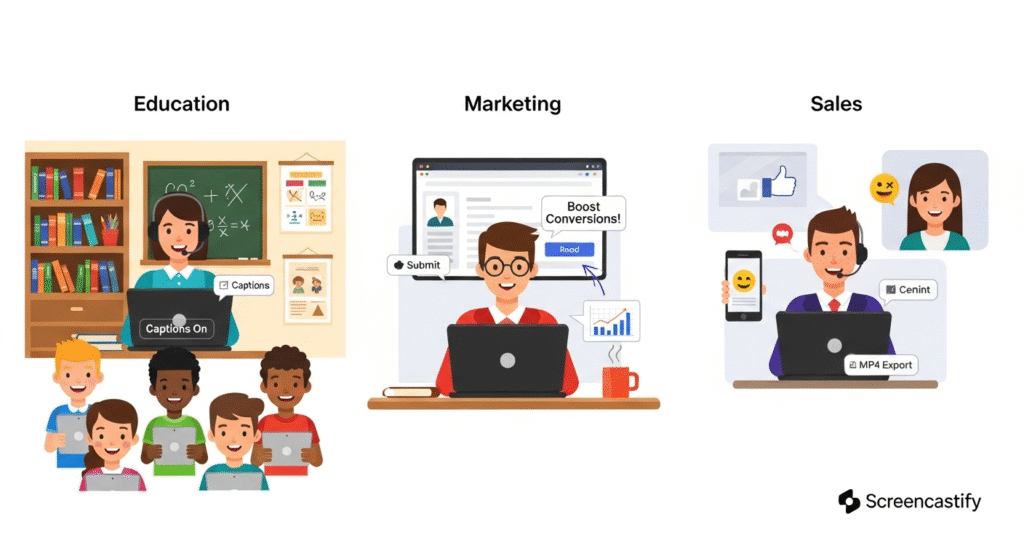
Screencastify is more than a free screen recorder, it’s a tool that brings your ideas to life. For teachers, it makes learning fun and inclusive. For marketers, it crafts demos that convert. For sales reps, it closes deals with a personal touch. With its easy interface, powerful features, and 2026–2026 school packages, Screencastify is your ticket to better communication. Visit screencastify.com and start creating today.
Frequently Asked Questions About Screencastify (2026)
- What is Screencastify?
Screencastify is a free screen recorder and Chrome/Edge extension that lets you record videos, edit them, and create interactive video content for education, marketing, and sales. No software download needed! - Is Screencastify really free?
Yes! The free screen recorder offers up to 10 videos (30 minutes each) with basic editing. Paid plans (Starter/Pro) unlock unlimited recordings and advanced features for screen recorder for Windows or Mac users. - Can I use Screencastify for education?
Absolutely! Teachers use it to record videos for flipped classrooms, collect student submissions via the Submit feature, and add Interactive Questions to engage students in education. - How does Screencastify help with marketing?
Marketers can create interactive video content like product demos or tutorials, add captions in 100+ languages, and export as MP4/GIF for marketing campaigns on social media or email. - Does Screencastify work on all devices?
It’s a screen recorder for laptop extension, best for Chrome/Edge on Windows, Mac, or Chromebooks. Mobile support is limited, but desktop recording is seamless. - Is Screencastify secure for schools?
Yes! It’s SOPPA, FERPA, and COPPA compliant, ensuring student data safety in education. Videos are securely stored in Google Drive with customizable sharing options.